
The plant in a browser tab — sentry and IQ.
SENTRIQ is our browser-based SCADA: ISA-101 HMI in 2D and 3D, ISA-18.2 alarming, a historian with trends and reporting, and OEE — over Modbus, OPC UA, S7, EtherNet/IP and MQTT. One self-contained installer, no runtime to chase, and it comes back up on its own after a reboot.
Windows 64-bit · 98.8 MB · free 30-day trial with every feature unlocked
A full SCADA stack that installs like an app.
Most plants that need supervision end up choosing between a logger that only draws graphs and a platform that needs a server, a database administrator and a licence negotiation. SENTRIQ sits where the work actually is: one executable with the web server, the drivers, the historian and the HMI inside it.
It installs as the ModbusDatalogger Windows Service, starts at boot, restarts itself on failure, and serves the whole interface at http://localhost:5000 — so operators, engineers and the plant manager all open the same URL and see what their role allows.
Everything below is in the download. The 30-day trial runs at the top edition, so you can build screens, raise alarms and export a shift report before any money or key changes hands.
Connectivity
Devices & drivers
Modbus TCP and RTU, OPC UA, Siemens S7 over ISO-on-TCP, EtherNet/IP (CIP) tag names, and MQTT subscribe — each connection polled on its own interval with pooled, self-healing sockets.
Tag database
Holding, input, coil and discrete registers; Int16/32, UInt16/32, Float32/64 with word-swap variants, Boolean — each with scale, offset, engineering units and write limits.
Calculated tags
Expressions, totalisers, run-hour meters, counters and operator-writable memory tags evaluated by the server — no PLC change needed to derive a value.
Built-in simulator
A Modbus TCP server with demo scenarios inside the app, so screens, alarms and reports can be built and demonstrated before the panel ships.
Visualization
HMI builder & runtime
Drag-and-drop 2D screens with layers, groups, snap and guides. Any property — colour, blink, visibility, position, label — binds to a live expression over your tags.
3D plant view
Import GLB equipment models, place them in a scene, and animate them from tags: states, labels, viewpoints and click-through to detail, all in the browser.
ISA-101 by default
Neutral greys for normal operation, colour reserved for abnormal states, data quality always visible — the high-performance HMI style, not a dashboard theme.
Trends on demand
A live trend dock over any screen: drop pens in, switch between live, 1 h, 8 h, 24 h and 7 d without leaving the process graphic.
Alarming & control
ISA-18.2 alarm engine
Four priorities with the standard shapes, flashing only while unacknowledged, shelving, suppression and alarm-performance KPIs.
Notifications
Alarms out by email, webhook or Telegram, with per-rule routing so the night shift is not woken by a low-priority deviation.
Server-side scripting
Sandboxed JavaScript on the server, never in the operator's browser. A script queues a write; the operator confirms it in the normal dialog, with role checks, limits and audit untouched.
Governed writes
Every write — HMI, batch or script — passes one service: resolve, enable check, engineering limits, driver, audit entry. E-signature when the Part 11 policy is on.
Production & reporting
OEE & downtime
A production model over your tags: availability, performance and quality, with downtime reasons and shift-aware roll-ups.
Historian
Query raw samples or 1 m / 5 m / 15 m / 1 h / 1 d aggregates with avg, min, max, sum and count over any date range.
Reports
Wide reports — one row per timestamp, one column per register — exported to Excel (.xlsx) or PDF, on demand or emailed on a schedule.
Storage policy
Retention window, maximum database size, automatic rotation, live usage figures, and manual purge and compact. The disk cannot quietly fill.
Operations & governance
Runs as a Windows Service
Automatic start at boot, restart on failure, polling resumes from the active configuration. Logging survives crashes and reboots with nobody logged in.
Users & roles
Admin, Operator and Viewer on ASP.NET Identity, cookie authentication, forced password change on first login.
Audit trail & diagnostics
Who changed what, alongside operational health — connection drops, poll errors, round-trip times — so a comms fault is not a mystery.
REST API
A documented HTTP API with API keys, for MES, ERP, Power BI or anything else that needs the plant's numbers.
Screens from a running install
Not mock-ups — a demonstration project that ships with the simulator, so you can open the same thing minutes after installing.
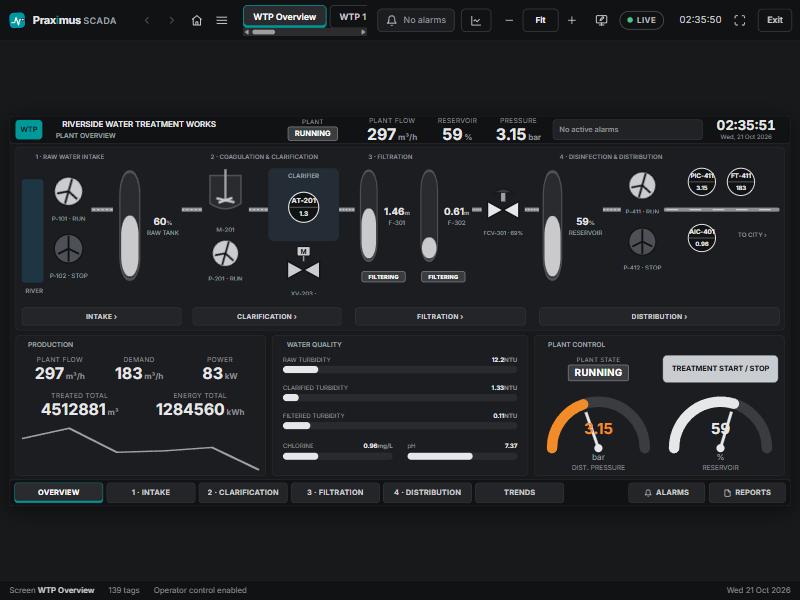
Runtime — ISA-101 plant overview
A water treatment works on one screen: four process areas, live values, equipment states and the alarm banner. Greys for normal, colour only where it means something.
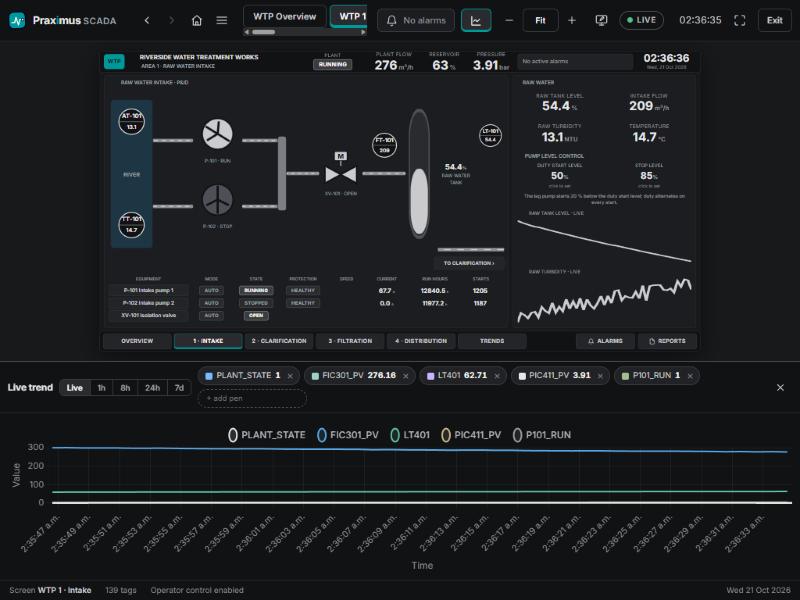
Area screen with the live trend dock
Drill into an area, pull pens into the dock, and watch the same tags the faceplates show — without leaving the graphic.
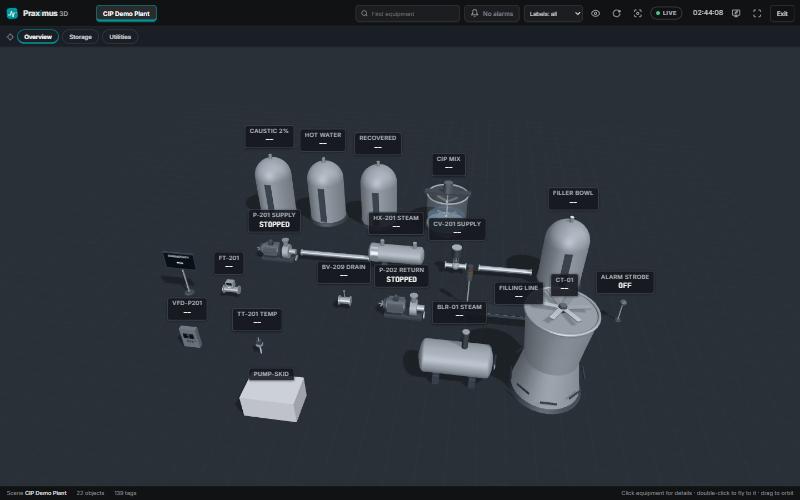
3D scene, animated from tags
Your own GLB equipment models placed in a scene, states and values drawn above them, click an item for its detail.
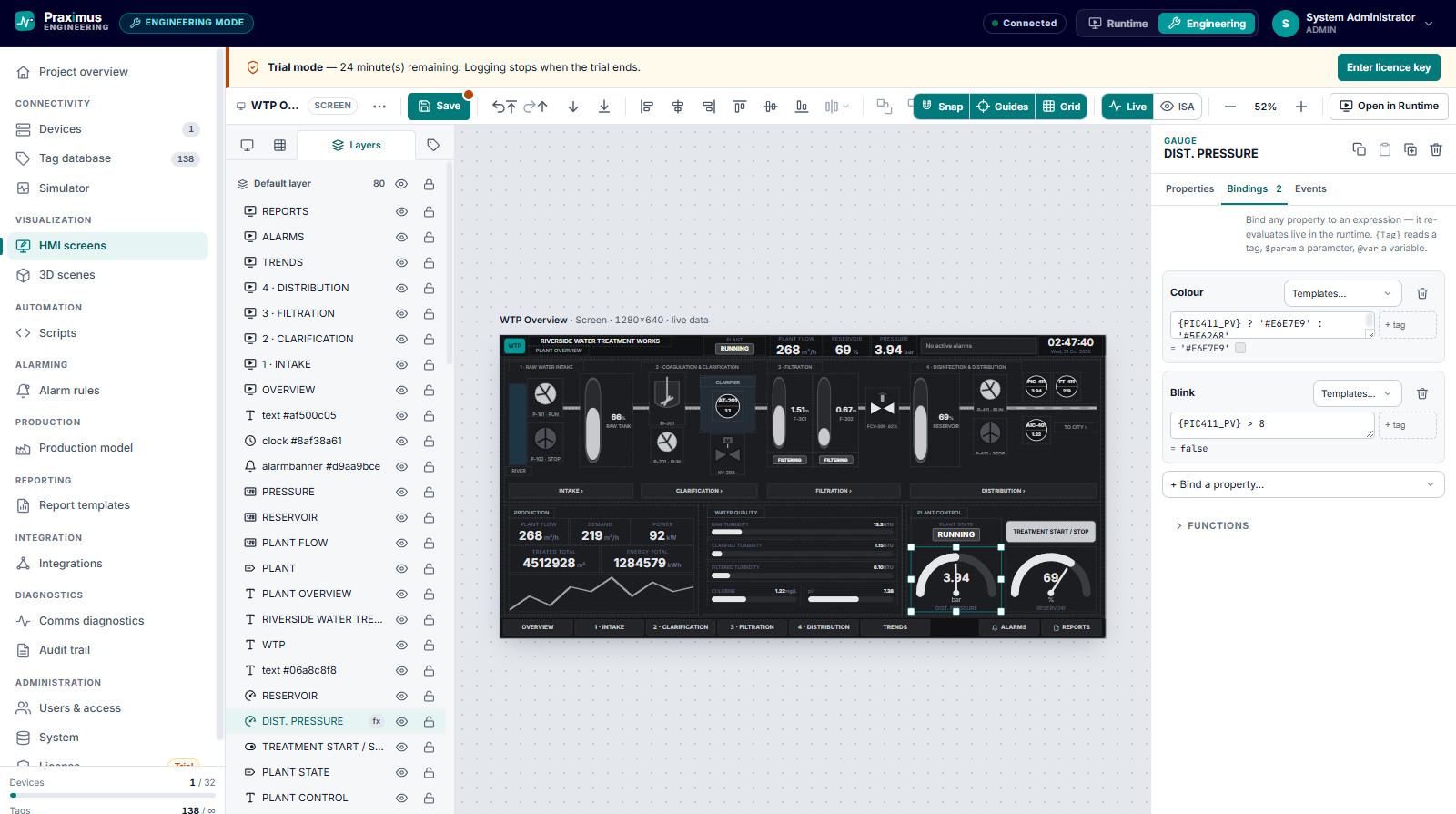
Engineering — the HMI builder
Bind any widget property to an expression over tags. Layers, grid and guides on the left, properties, bindings and events on the right.
One download, three licence levels
The installer is the same file for everyone. The key decides what is switched on, and how many connections and tags the install may carry.
| Capability | Logger Metering & data capture | SCADA Supervision & control | Plant Site-wide, integrated |
|---|---|---|---|
| Logging, dashboard, historian, reports, analytics | |||
| Storage policy, audit trail, diagnostics | |||
| Modbus TCP & RTU (serial) | |||
| Alarms & ISA-18.2 pack | — | ||
| HMI builder & SCADA runtime | — | ||
| 3D plant builder & runtime | — | ||
| Email / webhook / Telegram alerts | — | ||
| Real-time push updates | — | ||
| Simulator & demo scenarios | — | ||
| OPC UA client | — | — | |
| MQTT / UNS publisher | — | — | |
| OEE & downtime | — | — | |
| Scheduled emailed reports | — | — | |
| REST API & API keys | — | — | |
| Limits | 1 connection 250 tags | 5 connections 2 500 tags | 32 connections Unlimited tags |
A fresh install runs a 30-day trial at Plant level — every feature, so an evaluation is not crippled. When it ends, logging pauses until a key is entered; nothing already recorded is lost.
Praximus SENTRIQ 1.9.0
- File
- PraximusSENTRIQ_Setup_1.9.0.exe
- Size
- 98.8 MB
- Platform
- Windows x64
- SHA-256
- CBC3C7CC650200AA79B0C0A634A3563F641ADACD34901A5A14CE941062A59741
Unsigned build. Windows SmartScreen will warn the first time — choose “More info → Run anyway”, and check the SHA-256 above against the file you downloaded if you want certainty.
What the installer does
- 1Run it as administrator
The wizard asks for the HTTP port (5000 by default), the admin password, and a licence key if you already have one.
- 2Installs and registers
Application to C:\Program Files\Modbus Datalogger, data to C:\ProgramData\Modbus Datalogger\data, and the auto-start ModbusDatalogger service with restart-on-failure.
- 3Opens the dashboard
http://localhost:5000, user admin, the password you set. Upgrades keep the existing database, port and licence.
Unattended install
PraximusSENTRIQ_Setup_1.9.0.exe /VERYSILENT /SUPPRESSMSGBOXES
  /PORT=5000 /BINDADDRESS=0.0.0.0 /ADMINPASSWORD=… /LICENSEKEY=PDL-…
Licensing
A key is issued against one PC's MAC address and validated offline — no call home, no licence server on the plant network. The address is shown by the installer and under Engineering → License. Send it to sales@praximus.in and enter the key you get back; logging resumes immediately.
System requirements
- Operating system
- Windows 10 / 11 or Windows Server 2016 and later, 64-bit
- Runtime
- None — the .NET runtime is bundled inside the executable
- Privileges
- Administrator (it registers a Windows Service)
- Disk
- ~500 MB for the application, plus whatever the historian is allowed to keep
- Network
- Serves the dashboard on port 5000 by default; the port is set in the wizard
- Browser
- Any current Chrome, Edge or Firefox — on the PC itself or across the plant LAN
Want it wired to your plant, not just installed?
We build the tag database, the screens and the reports against your actual PLCs and instruments — the same engineers who wrote SENTRIQ. Panel, PLC, network, and the decisions on top of it.